
Best Air Purifiers For 3D Printer Room – 2026 Reviews

3D printing changes the air in a room. Even a well-behaved printer can leave you with a faint plastic smell, ultrafine particles drifting out of the enclosure, and VOCs that build up while you’re working at the same desk. A standard bedroom purifier may clean dust and pollen, but a 3D printer room asks for a different balance: real HEPA capture, a legitimate carbon or gas-phase stage, enough CADR for the room, and noise low enough that you’ll actually leave it running through a long print.
That’s the lens we used for this guide. We looked at air purifiers that can handle continuous operation, respond to changing air quality, and pair particle filtration with odor and VOC control. Room size matters, but so does placement: a compact unit beside a printer enclosure does different work than a large-room purifier clearing the whole space. The picks below span those jobs, from small-room budget options to coverage-first machines for open basements.
Best Air Purifiers for 3D Printer Room – 2026 Reviews
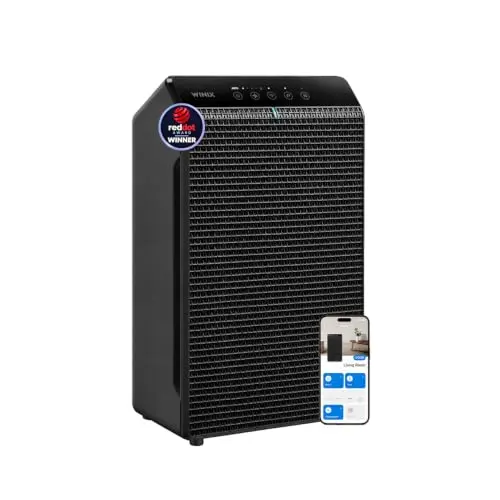
5520 – Large-Room HEPA with Carbon Odor Control
A large-room purifier with True HEPA and a high-deodorization carbon filter, the combination that matters most in a 3D printer room. The 5520 pairs that filtration stack with an air-quality sensor, auto fan speed, and a sleep mode that dims for late-night prints.
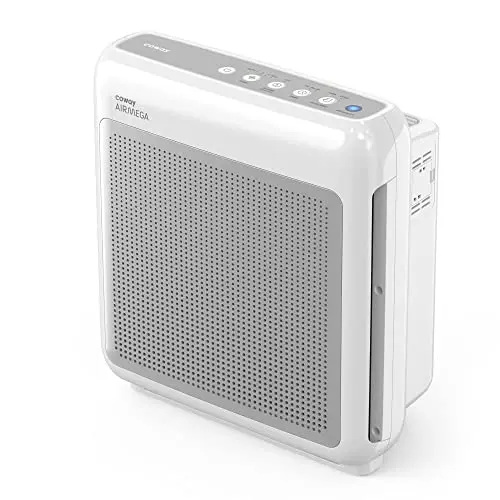
Airmega 200M – VOC-Focused Auto Purifier
A mid-range purifier with explicit VOC and odor reduction, auto and Eco modes, and a real-time air-quality display. The Airmega 200M is a strong fit for a medium 3D printer room where you want the unit to react to fumes and then dial back when the air clears.
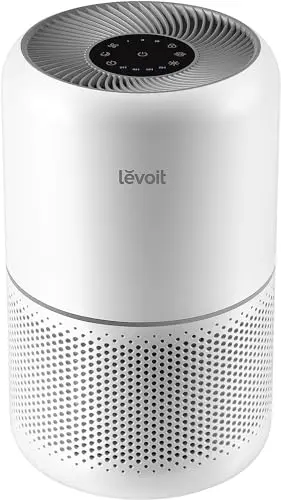
Core 300-P – Quiet Budget HEPA
A compact, budget-friendly purifier with AHAM-verified CADR, HEPA-grade capture, and a listed VOC filtration capability. The Core 300-P suits a small print room or supplemental placement near an enclosure, especially when quiet operation matters.

W5302300 – Large-Room Smart Control
A large-room purifier with Matter smart-home support, an odor sensor, and a washable pre-filter. The W5302300 is built for bigger print spaces and automatic response, though heavy VOC workloads call for a close look at the gas-phase filter spec.
How We Evaluated These Air Purifiers for a 3D Printer Room
We did not run controlled 3D-printer emissions testing or lab-grade VOC decay measurements. What we did: cross-referenced four air purifier models from four distinct brands across five decision axes – particle filtration, gas-phase/VOC media, room-size coverage and CADR, noise and continuous-operation suitability, and smart controls plus filter maintenance. We triangulated published specifications, feature sets, owner feedback where available, and use-case fit against the realities of a 3D printer room: an enclosed or open printer, a workspace you may share, and long sessions where the purifier needs to keep running. That is the trade-off we scored most heavily: a purifier that is technically capable but too loud or too inconvenient will not run through a long print. We mapped each model’s filtration stack against the common concerns – ultrafine particles, plastic odor, and volatile organic compounds – and weighed how easily each unit fits into a room where you also work. We did not measure airflow with a calibrated hood or sound levels with a meter, so those judgments rest on published specs and owner feedback where available.
The scoring framework weighted real-world fit for a 3D printer room (70%) – HEPA capture plus carbon/VOC control, appropriate CADR, and livable noise – against feature differentiation (30%) – unique controls, sensors, smart-home support, and maintenance design. We have no commercial relationship with any brand featured; recommendations track fit and differentiation, not brand preference. If you want the strongest all-around carbon-and-HEPA package, the Winix 5520 is the pick; if explicit VOC reduction and auto response matter more, the Coway Airmega 200M is the better match.
How to Choose the Right Air Purifier for a 3D Printer Room
1. Why a 3D Printer Room Needs More Than a Basic HEPA Air Purifier
A 3D printer can put two different problems into the air: particles and gases. HEPA media handles the particle side, but the plastic smell and volatile organic compounds that often come with printing need activated carbon or another gas-phase filtration stage. That is the first split between a bedroom purifier and a 3D-printer-room purifier.
Look for a filter stack that names carbon, not just a thin dust sheet. The carbon does not last forever, so a purifier with a sensible filter replacement path matters as much as the first-day spec sheet.
2. Match Air Purifier CADR to Your 3D Printer Room Size
CADR is the number that tells you how quickly a purifier moves clean air, and it matters more in a print room than raw room-area claims. A small enclosure room can get by with a compact unit; a basement or open studio needs more air changes per hour and a higher smoke/dust CADR. Use the room’s real room volume, not just the footprint, and account for closed doors.
If the printer shares a large open basement, the SwitchBot W5302300 is the coverage pick because its large-room design is built for high-volume spaces.
3. Gas-Phase Filtration for 3D Printer VOCs and Odors
Carbon needs contact time to work. A tiny carbon sheet in a high-speed mini purifier will knock down some odor, but it will not give you much dwell time for VOCs. A larger carbon filter with a slower fan setting, plus a realistic replacement cadence, is the better setup for a room where the printer runs often.
For explicit VOC reduction, the Coway Airmega 200M is the clear route in this lineup.
4. Noise, Uptime, and Placement in a 3D Printer Room
You will not run a purifier consistently if it sounds like a leaf blower next to your desk. Continuous operation is the goal, so a sleep mode or low-speed setting that stays below annoying is a real feature. Placement also matters: keep the intake clear, put the unit near the printer enclosure if the room is large, and avoid corners that choke airflow.
A purifier that ramps up only when the air quality drops can be easier to live with than one that runs at full tilt all day.
5. Smart Controls and Filter Maintenance for 3D Printing Spaces
An auto mode with a particle or odor sensor is useful in a print room because air quality changes with each job. A filter indicator keeps you from guessing when the carbon is spent, and a washable pre-filter cuts down on the dust and plastic debris that can load the main filter early.
For a small room and simple controls, the Levoit Core 300-P is the budget route, with AHAM-verified CADR and a listed VOC filtration capability.
Frequently Asked Questions
1. Do air purifiers actually help with 3D printer fumes?
They help with the part of the problem that can be filtered: airborne particles and some odors/VOCs. A purifier with HEPA filtration and a real activated carbon stage can reduce what you breathe during and after a print, but it is not a substitute for ventilation or an enclosure. The practical setup is source control first, then continuous operation from a purifier sized for the room.
If you want one unit that balances both particle and gas-phase capture, the Winix 5520 is the pick.
2. What's the difference between the Winix 5520 and Coway Airmega 200M for a 3D printer room?
Both pair HEPA with carbon, but they lean in different directions. The Winix 5520 emphasizes large-room coverage, a high-deodorization carbon filter, and an auto mode driven by its air-quality sensor. The Coway Airmega 200M makes a more explicit VOC reduction claim and adds Eco mode for quieter stretches.
Choose the Winix for a bigger or more open print space; choose the Coway Airmega 200M if you want the VOC/odor story front and center.
3. Is the Levoit Core 300-P enough for a small 3D printer room?
For a small, closed room, yes, with caveats. The Core 300-P has AHAM-verified CADR, HEPA-grade capture, and a listed VOC filtration capability, plus a genuinely quiet sleep mode. It is not the right tool for a large open basement or a print farm with multiple machines, where room-volume coverage becomes the limiting factor.
Think of it as a focused small-room purifier rather than a whole-floor solution.
4. What's the difference between the SwitchBot W5302300 and Levoit Core 300-P?
The SwitchBot is built for large-room coverage and smart-home integration, including Matter support, an odor sensor, and a washable pre-filter. The Levoit Core 300-P is a compact, simpler unit with a smaller coverage envelope and a lower-key control set. If you want automation across a big space, the SwitchBot makes more sense; if you want a quiet small-room purifier, the Levoit is easier to place.
5. How often should I run an air purifier in a 3D printer room?
Run it during every print session and for a while afterward, because particles and odors linger after the job ends. For sensitive users or a room with poor ventilation, continuous operation on a low or auto mode setting is the more reliable habit. Keep an eye on carbon filter replacement; a loaded carbon stage can stop helping with odors even while the HEPA side still moves air.
Final Verdict
For most 3D printer rooms, the Winix 5520 is the best starting point. It gives you True HEPA and a serious carbon layer, plus the auto response and room coverage that make continuous operation realistic. If your main worry is VOCs and plastic odor, the Coway Airmega 200M is the more targeted choice, with explicit VOC reduction and a useful air-quality monitor. For a compact room or a budget-minded setup, the Levoit Core 300-P covers the basics without taking over the space. And if the printer lives in a large open basement, the SwitchBot W5302300 is the coverage-first option, provided you confirm the gas-phase media suits your workload. Match the purifier to the room, run it through the full print, and replace the carbon before it goes flat.
