
Best Alarm Clock Charging Stations – 2026 Reviews

There’s a specific kind of chaos that builds up on a nightstand: a phone cable, a watch charger, a pair of earbuds hunting for a port, and underneath it all an alarm clock fighting for the last free outlet. The products in this category exist to end that. They fold the clock, the charging, and often a speaker or radio into one footprint, so the bedside table goes back to being furniture instead of a cable junction.
The tricky part is that “charging station” means wildly different things depending on the maker. One clock gives you a wireless pad on top, another packs four USB ports and three AC outlets, another charges an iPhone and an Apple Watch from a magnet. So the first decision isn’t which clock – it’s which charging job you actually need done overnight. Get that wrong and you’ll own a perfectly nice clock that can’t charge your phone.
The second axis is the waking side: alarm volume range, how many sounds you get, and the detail people consistently underestimate – how far the display dims. A clock that lights up the room at 2am gets unplugged no matter how good its charger is. We compared the major options across both axes so you can match one to your nightstand instead of guessing from a spec sheet.
Best Alarm Clock Charging Stations – 2026 Reviews
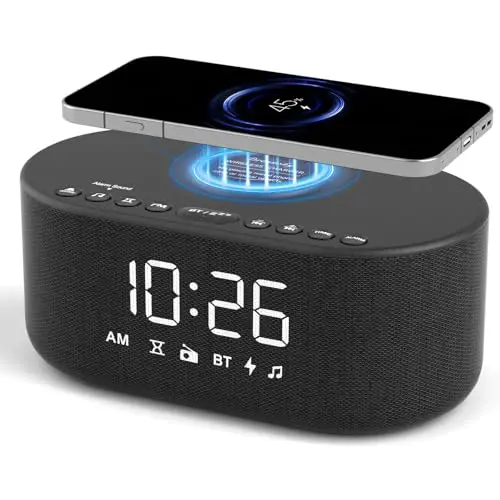
DS2266 – Wireless Charging Clock Radio with Bluetooth
A genuinely all-in-one bedside unit: a digital clock with a wireless charging pad, an extra USB port for a second device, a stereo Bluetooth speaker, and an FM radio with a sleep timer. Nine alarm sounds and sixteen volume steps give you real control over how you wake up.

AC190 – Wooden Bluetooth Clock with Qi Charging
A wooden-finish bedside clock that doubles as a Bluetooth speaker, an FM radio, and a Qi wireless charging pad, with an extra USB port for a second device and a display dimmer that runs from full brightness to completely off.
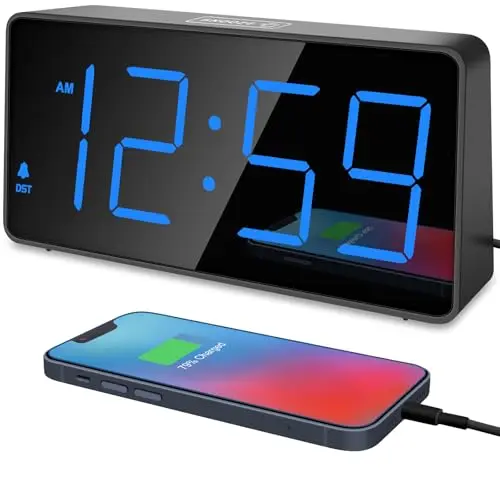
MHP6010 – Big-Digit Bedside Clock with USB Charging
A stripped-down bedside clock with two-inch LED digits, five brightness levels, five alarm volumes, a single USB port for overnight phone charging, and battery backup that holds your settings and alarm through a power cut.

JACKYLED305 – Nightstand Power Strip and Alarm Clock
Part power strip, part alarm clock: three AC outlets and four USB ports share the housing with a full-width LED clock, dual alarms, snooze, and a 1700J surge-protection rating.
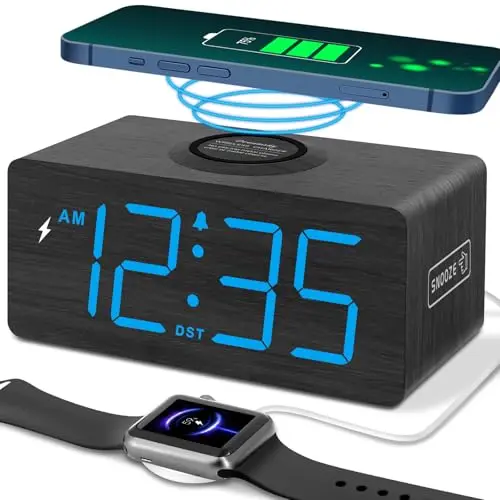
DS2203 – Wooden Clock with 10W Wireless Charging
A compact wooden clock with a 10W wireless charging pad on top, a USB port for a second device, large 1.8-inch digits, five brightness levels including an off setting, and a manual DST control that saves the twice-yearly button dance.
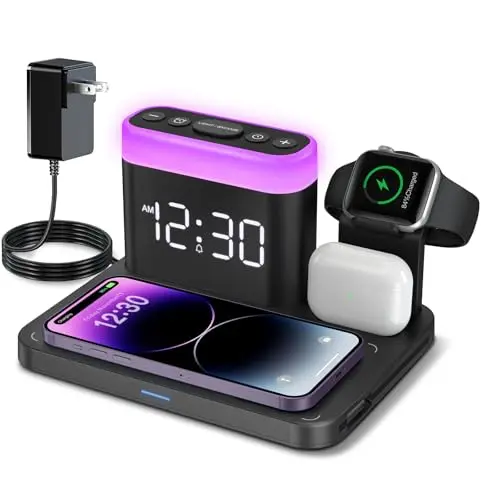
AC198MD – 5-in-1 Apple Charging Stand with Alarm
A magnetic charging stand built for Apple gear – iPhone, Apple Watch and AirPods – with a digital alarm clock, a seven-color night light, and a variable brightness display in one upright unit.
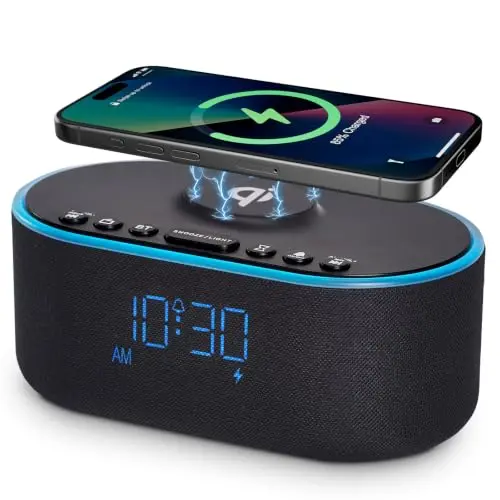
UE268 – Charging Clock Radio with Mood Light
A rounded clock radio with a 10W Qi charging pad, a USB port, a 10W stereo Bluetooth speaker, FM radio with sleep timer, and an eight-color night light behind a 0-100% dimmable display.
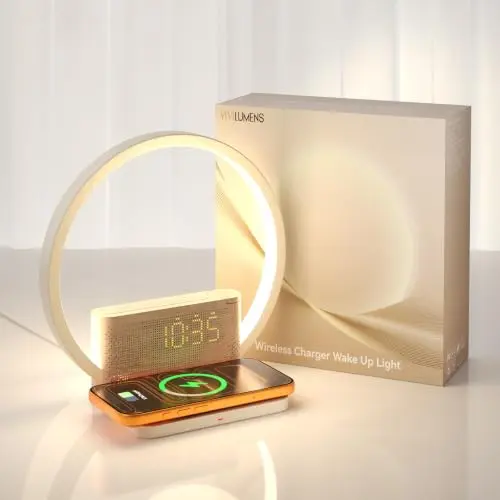
AJ310B-2 – Sunrise Alarm with Wireless Charging
A sunrise alarm clock that brightens gradually over ten minutes before the alarm, with a wireless charging pad, a touch bedside lamp, twenty white-noise and nature sounds, and a 30/60/90-minute sleep timer.
How We Evaluated These Alarm Clock Charging Stations
We didn’t run bench tests on charging output or measure alarm volume with a sound meter. What we did: cross-referenced 8 alarm clock charging stations from 6 distinct brands across six decision axes – charging capacity and port mix, alarm volume and customization, display dimming range, footprint, extra features like Bluetooth and radio, and owner-reported reliability. We triangulated published specifications, feature sets, and owner feedback where available, then mapped each unit against representative buyer profiles: light sleepers, heavy sleepers, Apple households, and people whose nightstand is really a power problem.
The scoring framework weighted real-world fit (70%) – how well each clock actually solves the bedside charging and waking job – against feature differentiation (30%), meaning the extras that make one unit a better match for a specific buyer rather than a generic win. We have no commercial relationship with any brand here; recommendations track fit and differentiation, not brand preference. If you want one box to do the lot, the DS2266 is the one we’d point to; if three outlets and four USB ports matter more to you than a wireless pad, the JACKYLED305 is the better answer.
Reliability carried real weight in the scoring. Several units in this category charge beautifully in week one and stop months later, so a troubled record counted against a product even when the spec sheet looked strong. Where a clock’s headline feature is a charging pad, we paid particular attention to how consistently that pad behaves night after night.
How to Choose the Right Alarm Clock Charging Station
1. What to Look For in an Alarm Clock Charging Station
The category is small and slightly confusing, because “charging station” means different things to different makers. For some it’s a Qi wireless pad built into the top of the clock; for others it’s a USB port around the back; for one model here it’s a full power strip with AC outlets. Decide which of those you actually need before you compare anything else, because it’s the biggest split in the market.
Once that’s settled, four things separate a keeper from a return: dimming range, alarm volume control, charging reliability, and footprint. Every clock here gets the time roughly right. The differences show up at 2am, when a display is too bright, or at 6am, when the alarm is too quiet.
2. Wireless Pad or USB Ports: Matching Your Alarm Clock Charging Station to Your Devices
A Qi pad is the most convenient option if your phone supports it – you drop the phone down at night and pick it up charged. The trade-offs are heat, case thickness and long-term reliability; most makers advise removing thick cases, and one stand here specifies cases under 5mm. A USB-A port is slower but near-universal, and it’s the better bet for a watch, earbuds or an older phone. If you need to power a lamp, a fan or a laptop brick, you want AC outlets, and that’s a small club – the JACKYLED305 is the only clock here that has them.
3. Why Display Dimming Decides Whether You Keep the Clock
A clock can be perfect on paper and still get boxed up because the display glows like a nightlight. Look for a continuous dimmer or at least five steps, and check whether the lowest setting is fully off. One model uses a 0-100% dimmer wheel; others offer an off setting outright; a few give you five levels with a genuinely dark floor. Anything with three brightness steps and a bright baseline is a gamble in a dark bedroom.
4. Alarm Volume and Wake-Up Style: Heavy Sleepers vs. Gentle Risers
Volume control matters more than raw loudness. A clock that only does “loud” is a bad fit for a light sleeper sharing a bed with a heavy one. Adjustable volume steps – sixteen on one unit, five on a couple of others, three on the Apple stand – let you tune the wake-up to the person. If you sleep through everything, prioritise the top end of the range and a long alarm duration. If you want to be coaxed awake, look at a sunrise simulation or a radio alarm instead of a buzzer.
5. Footprint and Build: What Actually Fits on a Nightstand
Measure before you buy. A power-strip clock occupies a long, low footprint and really wants a wide nightstand; a compact wooden unit like the DS2203 tucks into a corner. Build material matters too – wood and fabric housings look better in a bedroom than glossy plastic, and they’re less likely to rattle when the alarm goes off. If space is genuinely tight, favour a single-object design where the phone sits on the clock rather than beside it.
6. How Much Do You Need to Spend on a Bedside Charging Clock?
This category splits cleanly into three tiers. Entry-level clocks give you big digits, an alarm and a single USB port – the MHP6010 lives here, and it’s genuinely all many people need. Mid-range adds a wireless pad, better dimming and a nicer housing. Premium buys Bluetooth speakers, FM radio, sunrise lighting or multi-device Apple charging, and it’s worth paying for only if you’ll use those features nightly. Don’t pay premium for a radio you’ll never switch on.
Frequently Asked Questions
1. What's the difference between the DreamSky DS2266 and the ANJANK AC190?
Both combine a clock, a wireless pad, a USB port and a Bluetooth speaker, so the decision comes down to priorities. The DS2266 leans harder into alarm customization with nine sounds and sixteen volume steps, plus automatic time sync over Bluetooth. The AC190 is the better-looking object of the two, with a real wooden cabinet and an 18-month warranty. If you care about waking up on your own terms, take the DreamSky; if the nightstand is somewhere guests actually see, take the ANJANK.
2. JACKYLED305 vs. DreamSky DS2203: which is the better bedside charging station?
They solve different problems. The JACKYLED305 is for the person with too many plugs – three AC outlets, four USB ports and 1700J surge protection turn the nightstand into a small power hub, with the clock almost as a bonus. The DS2203 is the neater, calmer choice: a 10W wireless pad, one USB port, a wooden body and an off setting for the display. Charging phones and earbuds only? The DreamSky looks better and does the job. Powering a lamp and a fan? Only the JACKYLED will do.
3. Will a wireless charging alarm clock work through a phone case?
Usually, with limits. Thin cases are fine; thick, magnetic or wallet-style cases are not, and most makers advise removing the case when charging is slow or inconsistent. The ANJANK charging stand specifies a case thickness under 5mm, and the Vivilumens instructions ask you to remove cases before charging. If your phone lives in a rugged case, plan on a USB cable rather than the pad.
4. Do these alarm clock charging stations keep the alarm running when the power goes out?
Some do. The Peakeep and the DreamSky DS2203 both take AAA batteries so the alarm still fires during an outage, and the JACKYLED keeps its clock and alarm settings on two AAA cells. Units marketed as strictly adapter-powered – the DS2266 among them – have no such safety net. If outages are common where you live, check for battery backup before you commit.
5. Can I charge more than one device at a time on a bedside clock charger?
Yes on most of these, but the details vary. Dual-device charging usually means a wireless pad plus one USB port, which covers the DS2266, AC190 and DS2203. The JACKYLED goes much further with four USB ports and three outlets, and the ANJANK stand charges an iPhone, Apple Watch and AirPods together. The limitation to watch is total output – a shared 4.8A USB bank charges each device slowly when everything is plugged in at once.
Final Verdict
For most people, the DS2266 is the answer. It covers both jobs in the category name – charging and waking – with a wireless pad, a spare USB port, sixteen alarm volumes and a dimmer that goes all the way down, and it does it without cluttering the nightstand.
If your nightstand is really a power shortage, the JACKYLED305 replaces a power strip outright. If you want the least complicated thing that works, the MHP6010 gives you big digits, a loud alarm and a USB port for entry-level money – no wireless pad, no app, no fuss. And if the nightstand is all Apple, the ANJANK AC198MD earns its place by charging the phone, the watch and the earbuds from one stand.
