
Best Carry-On Luggage With Computer Compartment – 2026 Reviews

You know the moment. The security line is moving, the bin ahead of you is already on the belt, and you’re kneeling on the floor trying to unzip a suitcase packed to the gills because your laptop is buried under three shirts and a pair of shoes. A carry-on with a real computer compartment exists to delete that moment from your life.
The catch is that “laptop compartment” means wildly different things across brands. Sometimes it’s a padded, exterior-accessible sleeve that holds a 15.6-inch machine snug against the back wall. Sometimes it’s a mesh panel glued to the inside of the front shell. The gap between those two is the gap between a bag you’ll love for years and one you’ll resent by the second trip.
This guide covers the market rather than one brand’s catalog. We looked at how each bag routes the laptop, how it measures against airline sizers, what the shell is made of, and how it rolls – because the best computer compartment in the world doesn’t help if the bag won’t fit in the overhead bin.
Best Carry-On Luggage With Computer Compartment – 2026 Reviews
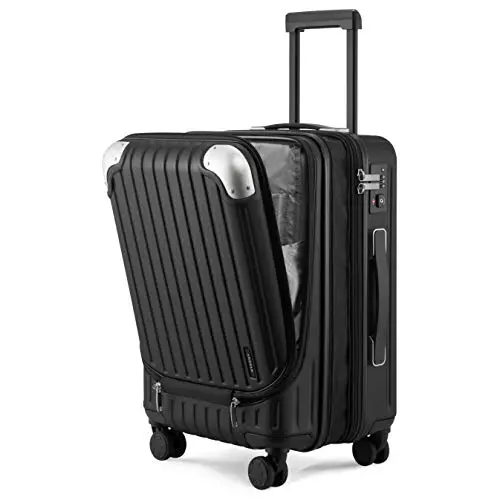
Grace Expandable 6576 – Front-Pocket Laptop Access
A hard-shell carry-on built around a dedicated front compartment that swallows a 15.6-inch laptop without disturbing your clothes. The micro-diamond textured PC+ABS shell resists scuffs, eight rubberized spinner wheels roll quietly, and a four-level aluminum handle lets tall and short travelers find a comfortable pull height.

Omni 2 Pro – QuickEntry Business Carry-On
Samsonite’s business-leaning spinner puts a QuickEntry front pocket behind the same TSA lock slider that secures the main compartment. Inside, dedicated mesh sleeves hold a 15-inch computer, a 10-inch device, and an 11-inch tablet in separate slots. A 1.5-inch expansion zipper adds room, and the polycarbonate shell carries a 10-year warranty.

20-Inch Tech Carry-On – Charging Port and Cosmetic Case
A gadget-forward hardshell with a padded laptop pocket, an iPad sleeve, and a power-bank pouch wired to an exterior USB port – bring your own battery. There’s also an insulated food pocket and a removable cosmetics case that straps to the handle. The expandable ABS+PC shell is built to the 22 x 14 x 9 carry-on standard.

PC Hardshell Carry-On – Expandable Front-Pocket Value
A 100% polycarbonate hardshell that treats laptop access as the headline feature: a quick-reach front pocket holds a 15.6-inch laptop and an 11-inch tablet, with an organization panel for documents. The expansion zipper takes capacity from 40L to 48L, and built-in side hooks hold a shopping bag so your hands stay free.

Dual-Opening Rolling Backpack – Underseat Laptop Carrier
Not a suitcase – a wheeled backpack that opens flat to 180 degrees and slips under the seat rather than into the overhead. Eighteen pockets include a padded sleeve for a 15.6-inch laptop behind lockable zippers, and hidden shoulder straps let you carry it on your back when pavement turns to stairs.

Softside Carry-On – Front Laptop Access and Wet Pocket
A softside carry-on with an exterior compartment sized for a 15.6-inch laptop and a tablet, plus a waterproof wet pocket for damp items and three front compartments for the small stuff. It measures to the common 22 x 14 x 9 standard and rolls on four silent spinner wheels with a TSA combination lock.
How We Evaluated These Carry-On Luggage With Computer Compartment
We didn’t fly with these bags or roll them through a single terminal. What we did: cross-referenced six carry-on models from five brands across seven decision axes – laptop compartment design, exterior dimensions against published airline limits, shell material, wheel and handle configuration, expansion capacity, lock hardware, and interior organization. We triangulated published specifications, feature sets, and owner feedback where available, then mapped each bag against three buyer profiles: the weekly business flyer, the gadget-heavy leisure traveler, and the short-trip underseat packer.
The scoring framework weighted real-world fit (70%) – how well a bag’s laptop access, capacity, and rolling behavior hold up in actual travel – against feature differentiation (30%) – the specific things one bag does that its competitors don’t. We have no commercial relationship with any brand here, and recommendations track fit and differentiation rather than brand preference. If you fly with a laptop every month, the LEVEL8 Grace Expandable is your match; if security checkpoints are the pain point, the Samsonite Omni 2 Pro solves it more directly.
A few things we can’t tell you: how these shells hold up after a hundred gate checks, or whether the wheels survive five years of sidewalk abuse. What we can: tell you which laptop compartment you can actually reach in a TSA line, which bags meet the sizing most airlines publish, and where each one cuts corners.
How to Choose the Right Carry-On Luggage With Computer Compartment
1. What Counts as a Carry-On With a Computer Compartment
Plenty of suitcases advertise a laptop pocket. Fewer actually have one. The difference is whether the compartment is padded and separate – a sleeve lifted away from the bottom edge of the bag – or a mesh panel stuck onto the inside of the front wall. A real compartment should hold a 15-inch or 15.6-inch laptop snugly enough that it doesn’t slide, with a second sleeve for a tablet if you carry one.
The second question is access. A compartment you reach from outside the bag is a different product from a sleeve you reach after unzipping the main packing area. Both are legitimate; they serve different trips.
2. Front Pocket or Interior Sleeve: Where Should Your Laptop Live?
An exterior front compartment is the security-line winner. You unzip, slide the machine out, and never expose your packing to a queue of strangers. The trade-off is protection: a front pocket sits on the outer wall, so a rigid shell matters more there than anywhere else on the bag.
An interior sleeve gives you more crush protection because the laptop sits between layers of clothing and a stiff back panel. It’s the better setup for a bag that gets gate-checked at the last minute, and the worse setup if you open the laptop mid-journey. Softside bags can do either, but they need genuinely thick padding to compensate for a fabric body.
3. Check the Sizer, Not the Sticker: Airline Dimensions for Carry-On Luggage
22 x 14 x 9 inches is the number most U.S. carriers publish, and it includes wheels and handles. Several bags in this category sit just outside it – a 14.5-inch width here, a 22.8-inch length there – which matters if your airline uses a metal sizer at the gate rather than a tape measure at check-in.
Expansion is the sneaky variable. A 1.5-inch expansion gusset is useful on the return leg, but it can push an otherwise compliant bag into checked-baggage territory on a full flight. Treat expansion as a one-way feature: pack it outbound, expect to check it coming home.
4. Rolling Backpack vs. Four-Wheel Carry-On
Four spinner wheels let you roll a bag upright alongside you, which is easier on your shoulder and harder in a crowded aisle. Two-wheel bags tilt and pull behind you – less agile, but more stable on curbs and easier to shove under a seat.
If underseat space is the priority, a rolling backpack like the Arcoyard dual-opening rolling backpack is the smarter shape. It converts to a backpack for stairs and fits where a hard-sided spinner simply won’t. If you’re a weekly flyer with a carry-on that always goes overhead, four wheels is the better long-term bet.
5. Shell Material and What It Means for Your Laptop
Polycarbonate flexes on impact and returns to shape, which is why it’s the material most often paired with a long warranty. ABS+PC blends cost less and feel stiffer, and a textured or micro-diamond finish hides scuffs that would show on gloss. Polypropylene sits in the same family – abrasion-resistant, water-resistant, and usually a little heavier for the same volume.
Softside polyester is the outlier. It won’t crack, it stretches around a bulky load, and it never really protects a laptop from a hard corner impact. If your machine rides in the front pocket, a rigid shell is worth the flexibility you give up.
6. LEVEL8 Grace vs. Samsonite Omni 2 Pro: Which Carry-On Fits Your Trip?
These two come closest to the same brief and split on one question: how do you want to open the bag?
The LEVEL8 Grace Expandable gives you a dedicated front compartment plus a four-level handle, eight wheels, and growth from 36 to 42 liters. It’s the better bag for longer trips and for travelers of different heights. The Samsonite Omni 2 Pro routes everything through one lock slider, with mesh sleeves sized for a 15-inch computer, a 10-inch device, and an 11-inch tablet – the better choice if the laptop comes out twice a day. Pick LEVEL8 for capacity and rolling comfort; pick Samsonite for checkpoint speed and warranty length.
Frequently Asked Questions
1. Will a carry-on with a front laptop pocket still fit in the overhead bin?
Almost always, as long as the bag is genuinely built to 22 x 14 x 9 inches and you aren’t on a carrier with tighter regional limits. Watch two things: the expansion zipper, which can add an inch or more once packed out, and the stated overall dimensions, which include wheels and handles. Bags that measure 14.5 inches wide or approach 23 inches long may need a sizer check before you commit.
2. What's the difference between the LEVEL8 Grace Expandable and the Samsonite Omni 2 Pro?
Access and capacity. The LEVEL8 Grace Expandable has a separate front compartment, eight spinner wheels, a four-level handle, and expansion from 36 to 42 liters – the better long-trip bag. The Samsonite Omni 2 Pro routes both the front pocket and the main compartment through one TSA lock slider and uses three dedicated mesh sleeves instead of a single pocket, which is faster at security. Samsonite backs it with a decade-long warranty; LEVEL8 uses a shorter term. If your trips run four days or more, the LEVEL8 Grace Expandable is the one to pack.
3. How does the TRAVELARIM tech carry-on compare with the LOVEVOOK hardside?
The TRAVELARIM is the gadget-first build: padding for a laptop and an iPad, a power-bank pocket wired to an exterior USB port, an insulated food pocket, and a removable cosmetic case that works as its own bag. The LOVEVOOK hardshell is the simpler, tougher-shell option: 100% polycarbonate, expansion from 40 to 48 liters, and side hooks for a shopping bag. Choose TRAVELARIM if you carry three devices and a battery; choose the LOVEVOOK PC Hardshell if you want more expandable volume and a rigid shell.
4. Is a front laptop compartment actually safe for a laptop?
It’s as safe as the padding around it. Check that the laptop sleeve is padded on both faces and lifted off the bottom edge of the case – a sleeve sitting flush on the shell takes the full impact of every drop. A hard polycarbonate shell behind that sleeve is meaningful protection. A softside front pocket is fine for a commuter machine but not for one you can’t replace.
5. Do I need a TSA lock on a carry-on with a computer compartment?
You need one that doesn’t fight you at security. TSA combination locks let agents open the bag without cutting the zipper pulls, and the better designs route the front compartment and the main compartment through a single lock. Treat any lock as a deterrent rather than real security, and keep passports, cash, and the laptop itself in the compartment you can see and reach.
Final Verdict
For most people, the LEVEL8 Grace Expandable is the answer. It gets the laptop out of the bag in one motion, rolls quieter than anything else here, and expands when a four-day trip turns into six. If checkpoints are your bottleneck and you want one lock doing double duty, the Samsonite Omni 2 Pro is the business-travel pick, even with a length that deserves a sizer check. On a tighter budget, the LOVEVOOK PC Hardshell brings polycarbonate and a front laptop pocket for far less. And if you’re squeezing under the seat on short hops, the Arcoyard rolling backpack is built for exactly that. Match the bag to how you actually fly, not to how much it can theoretically hold.
