
Best Gaming Pillows – 2026 Reviews

There’s a specific ache that comes from gaming the way most of us actually game: hunched on a bed with a handheld, elbows hovering in mid-air, or slouched on a sofa with a laptop slowly cooking your thighs. The screen isn’t the problem. The problem is that nothing is holding you up.
A good gaming pillow fixes that in one of two ways. Arm-support designs cradle your elbows and forearms so your shoulders stop doing the work. Lap-desk designs give you a flat, stable surface so a device isn’t balanced on your knees. Beyond that, the differences that matter are how the fill holds up through a long session, how much legroom the shape leaves you, and whether the cover can survive a wash without falling apart.
This guide covers the whole market, not one brand’s lineup. We looked at U-shaped arm supports, lap-desk pillows, full angled backrests, and lumbar cushions, then sorted them by the posture each one actually solves. Some are built for handheld sessions on the couch. Some want a keyboard and a mouse. Knowing which chair, bed, or floor spot you game from is half the decision.
Best Gaming Pillows – 2026 Reviews

Cooling Grey Reading Pillow – Extended U-Shape Arm Support
A U-shaped lap pillow that cradles both arms instead of leaving your elbows to hang. The extended tail folds forward for elbow support or tucks behind you as a backrest, and the cooling fabric cover is aimed at long sessions where bare arms get clammy.
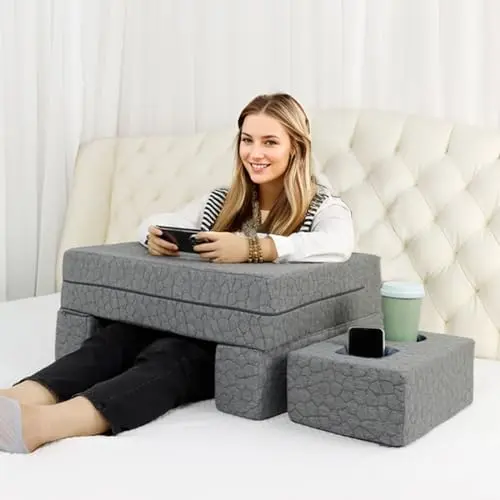
Memory Foam Lap Desk Pillow – Wide Leg Groove with Cup Holder
A lap desk and armrest pillow in one, with an ultra-wide leg groove and a foam top firm enough to hold a laptop steady. A separate caddy block adds a deep cup holder and pockets for the things you’d otherwise balance on your knee.
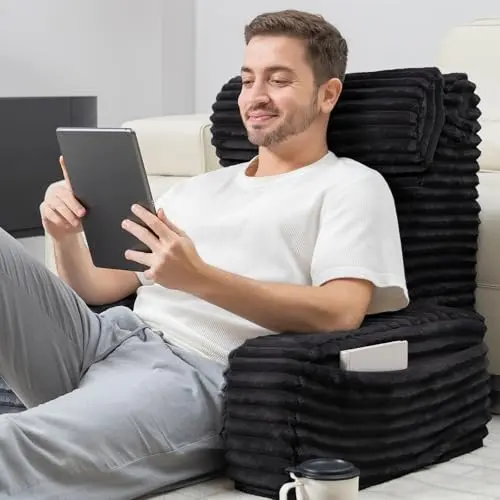
24-Inch XXL Back Pillow – Two-Layer Foam for Taller Players
A 24-inch back pillow built for taller sitters, with a 60-degree angled backrest and a two-layer foam core: dense foam underneath, high-resilience foam on top. Extra-large pockets on both sides and a faux fur cover round it out.
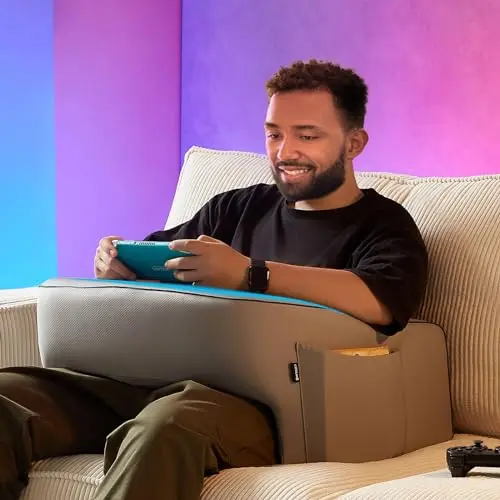
Extra Large Reading Pillow – Lap Desk with Armrests and Leg Groove
An extra-large reading pillow that doubles as a lap desk, with armrests, a flat working surface, and a leg groove you can sit cross-legged inside. Side pockets hold a remote and phone, and a storage cord keeps it out of the way between sessions.
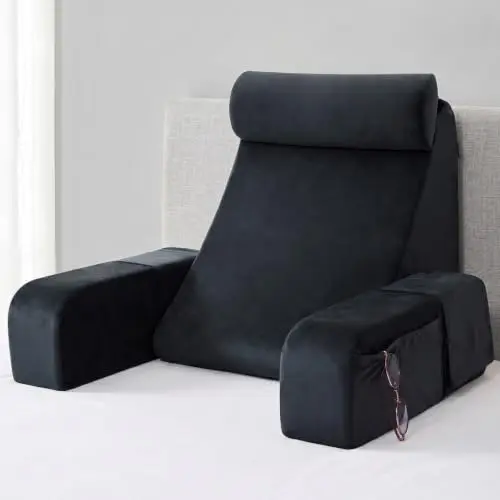
19-Inch Reading Pillow – Detachable Headrest and Armrests
A 19-inch back pillow with a 45-degree angled backrest and a genuinely modular design. The headrest and armrests detach, so the armrests can become leg support and the headrest can double as a lumbar cushion.
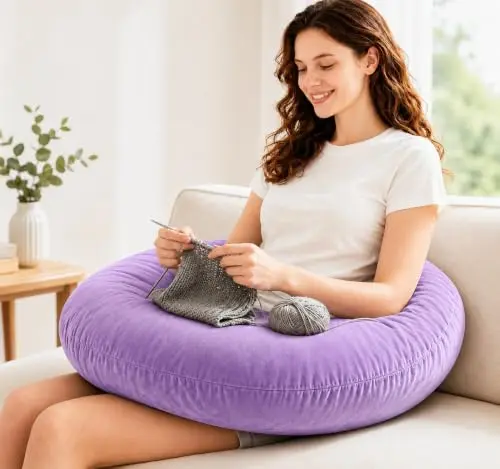
U-Shaped Arm Support Gaming Pillow – Soft Velvet Elbow Cradle
A soft U-shaped pillow that wraps around your lap and gives your elbows and forearms somewhere to land. Plush fiber fill and a crystal velvet cover make this the cushiest option in the lineup rather than the firmest.
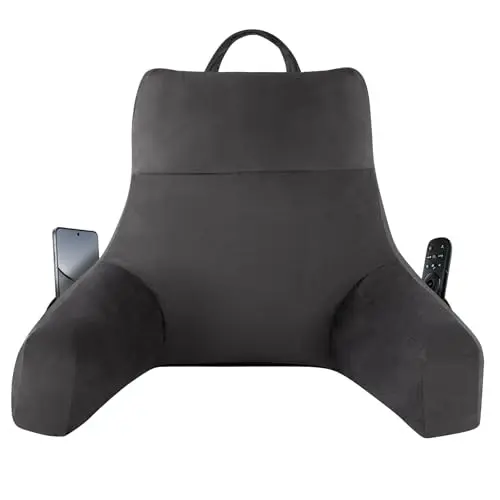
18-Inch Backrest Pillow – Customizable Shredded Foam Fill
An 18-inch backrest pillow with shredded memory foam you can adjust by unzipping the inner liner and adding or removing fill. Arm pockets, a carry handle, and a removable cover make it a practical dorm or small-space option.

Original Lumbar Support Pillow – Memory Foam Chair Back Support
A contoured memory foam lumbar cushion that straps to a chair and supports the lower back. It’s the pick here for people who game seated at a desk or in a gaming chair rather than on the floor.
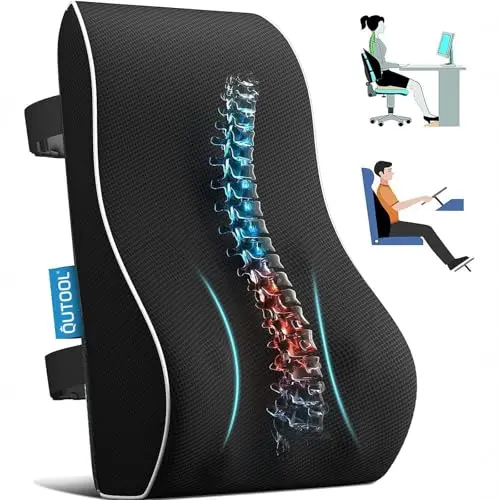
LSP-A Lumbar Pillow – Firm Molded Foam with Long Straps
A firm molded memory foam lumbar pillow with lengthened straps and a breathable 3D mesh cover. It can be flipped for upper-back support or sat upright for the lower back, and it’s built to stay anchored as you move.
How We Evaluated These Gaming Pillows
We didn’t spend a month with each of these strapped to our backs. What we did: cross-referenced 9 gaming pillow designs from 8 distinct brands across five decision axes – arm and elbow support geometry, top-surface firmness, legroom and footprint, cover fabric and washability, and back or neck support for long sessions. We triangulated published specifications, absorbed owner feedback where available, and mapped each design against the postures people actually game in: handheld on the sofa, laptop on the lap, keyboard and mouse on a cushion, and controller work in a chair.
Two families dominate this category, and knowing which one you need does most of the work. Arm-support pillows cradle your elbows so they stop hanging. Lap-desk pillows give you a flat, stable platform. The scoring framework weighted real-world fit (70%) – how well a pillow serves the posture it was designed for – against feature differentiation (30%), meaning the build details that separate one design from the next. We have no commercial relationship with any brand featured here; recommendations track fit and differentiation, not brand preference. For a single pillow that covers handheld play and reading, the QUEEN ROSE Reading Pillow is the safest all-round call. If your setup involves a laptop and a mouse, the Bespilow Lap Desk Pillow is built for exactly that.
A few things we can’t tell you: how the foam and fiber fills feel after a year of nightly use, or how each cover survives a dozen washes. What we can tell you is how the designs compare on paper, what each one is genuinely shaped to do, and where the tradeoffs land.
How to Choose the Right Gaming Pillows
1. What Makes a Pillow a Gaming Pillow, Not Just a Cushion
A bed pillow is soft by design, which is the opposite of what you need when you’re sitting upright with a controller. A purpose-built gaming pillow solves three specific problems: unsupported elbows, a device balanced on your knees, and a spine that slowly curls forward over a long session. The features that separate a real one from a generic cushion are arm or elbow support, a stable top surface, and enough internal structure to hold shape past the first hour.
Miss any of those and you’ll spend the session rearranging cushions instead of playing. That’s the honest test of whether a pillow earns the label.
2. Arm Support or Lap Desk: Match the Pillow to Your Game
The category splits cleanly. Arm-support pillows wrap your lap and give elbows and forearms somewhere to land – the vamorry U-Shaped Gaming Pillow and the U-shaped QUEEN ROSE are both this type. They suit handheld consoles, tablets, phones, and crafts, because your hands stay low and close to your body.
Lap desk pillows add a flat working surface and are the better fit for a laptop, keyboard, or mouse. Backrests are the third family: tall, angled pillows that prop up your whole torso for bed, floor, or sofa sessions. Lumbar cushions are the fourth and simplest. They strap to a chair and support the lower back, and they’re the right answer if you game at a desk rather than in bed. Buying the wrong family is the most common mistake in this category – a great backrest is useless if your problem is hovering elbows.
3. Fill and Firmness: What Still Holds Its Shape After Hour Three
Molded high-density memory foam is the most predictable choice. Solid foam cores, like the ones in the Bespilow lap desk, the ENITYA backrests, and the cooloo8 reading pillow, resist sagging and give a device something level to sit on. Shredded memory foam, as in the IPYNBAP backrest, trades a little consistency for adjustability: unzip the liner and add or remove fill until it feels right.
Fiber and polyester fills sit at the plush end. They’re comfortable against bare arms and easy to move around, but they won’t hold a laptop flat and they compress faster under sustained load. That isn’t a defect so much as the tradeoff for softness – and it’s exactly why a fiber pillow is usually the better pick for handheld play than for desk work.
4. Sizing a Gaming Pillow for Your Body and Your Space
For backrests, height is the number that matters. An 18-inch pillow suits smaller frames and tight rooms, a 19-inch model with a detachable headrest splits the difference, and a 24-inch XXL is the one that reaches the shoulders of taller players. For lap pillows, check the leg groove width if you sit cross-legged, and measure your chair before trusting a strap.
Footprint and storage deserve a thought too. Lap desks and XXL backrests don’t fold away, so if your gaming spot doubles as a shared living room, a lighter arm-support pillow will get used more often than a better one you can’t be bothered to haul out of the closet.
5. Covers, Cooling, and Cleaning: The Details That Decide Longevity
Cover material changes how a pillow feels at minute forty, not minute one. 3D mesh and cooling fabrics breathe; velvet and faux fur feel luxurious but run warm; polyester-spandex blends sit in between and resist pet hair. Look for a removable, machine-washable cover with a hidden or protected zipper. That single feature is the difference between a pillow you keep for years and one that gets retired when it starts to smell.
One hard rule: memory foam cores are never machine washable. Wash the cover only, in cold water, then air-dry or tumble low. Several of these ship vacuum-compressed and need a day or two to reach full loft, so don’t judge firmness in the first hour after unboxing.
6. Gaming Pillow Price Tiers: What Each Level Actually Buys You
Entry-level options are usually fiber-filled or simple foam shapes: soft, light, fine for handheld sessions, but not built to hold a device steady. The mid-range is where molded memory foam, washable covers, and useful pockets become standard, and it’s where most buyers should shop.
Premium tiers buy you multi-layer foam cores, XXL sizing, better cover fabrics, and extras like independent cup-holder caddies or detachable headrests. The ENITYA 24-Inch XXL Back Pillow is the clearest example: you’re paying for build complexity and size, not branding. If you sit for hours a day, that uplift is worth it. For occasional handheld sessions on the couch, it isn’t.
Frequently Asked Questions
1. What's the difference between the QUEEN ROSE reading pillow and the cooloo8 extra large reading pillow?
They solve different halves of the same problem. The QUEEN ROSE is an arm-support pillow: its U-shaped tail cradles your elbows and there’s no flat surface, so it’s happiest under a handheld console, a tablet, or a crochet project. The cooloo8 adds a flat lap-desk top and a leg groove, which makes it more useful when a controller or small laptop needs to sit level in front of you.
Simple rule: if your hands are always holding something, go with the QUEEN ROSE. If the device needs to rest on something, the cooloo8 reading pillow earns its place.
2. Bespilow lap desk pillow vs the vamorry U-shaped pillow, which suits a handheld setup?
For pure handheld play, the vamorry is the more sensible buy: its fiber fill keeps elbows cushioned, it weighs very little, and it moves between rooms without effort. The Bespilow becomes the better call the moment a keyboard, mouse, or laptop enters the picture, because its dense foam top doesn’t sag under weight.
Frame it as elbow comfort versus working surface. Pick the axis that matches how you actually play, and don’t pay for a lap desk you’ll only ever set a controller on.
3. Do gaming pillows actually help with posture?
They help in a mechanical, modest way. Arm support stops your shoulders from rolling forward, and an angled backrest keeps you from folding into a C-shape over a screen for three hours straight. What they don’t do is fix an underlying issue, because they’re comfort furniture rather than a medical device.
If your lower back is the part that aches after a session, a lumbar cushion like the Everlasting Comfort lumbar pillow addresses that specific complaint far better than any lap pillow will.
4. How do I size a gaming pillow for a taller or plus-size player?
Height matters more than width for backrests. A 24-inch pillow reaches the shoulders of players around six feet and up, while an 18-inch model is better suited to smaller frames and tighter rooms. For lap pillows, look at the leg groove width, since the Bespilow’s is deliberately wide, and check the strap length if you plan to anchor it to a chair.
Also measure the seat you’ll actually use. A pillow spec sheet quotes overall dimensions, not the width of your sofa cushion or gaming chair back.
5. Can I use a regular lumbar pillow with a gaming chair?
Yes, and it’s often the cheapest meaningful upgrade you can make. Gaming chairs tend to have flat backs with a shallow curve, which is exactly the gap a contoured lumbar cushion fills. Check the strap setup first: dual straps with extenders or lengthened straps fit more chair widths than a fixed loop.
Keep the profile thin, too. A thick cushion pushes you forward off the seat base and creates a different problem than the one you were solving.
Final Verdict
For most gamers, the QUEEN ROSE Reading Pillow is the answer. It cradles your arms without straps, breathes better than velvet, and doubles as a backrest when you flip the tail, which is more than most pillows in this category manage.
If your setup includes a keyboard or a laptop, go with the Bespilow Lap Desk Pillow, because its dense top is the difference between typing and sagging. Playing handheld on the sofa on a tight budget? The vamorry U-Shaped Gaming Pillow covers the basics for very little. And if you’re tall, game sitting up in bed, and want something that reaches your shoulders, the ENITYA 24-Inch XXL Back Pillow is purpose-built for exactly that.
Match the pillow to the posture you actually game in, and you’ll stop rearranging cushions every twenty minutes.
