
Best Laptop Pillow Desks – 2026 Reviews

A laptop balanced on a pillow feels clever for about ten minutes. Then the pillow shifts, the screen tilts, and the mouse starts sliding toward the edge of the couch. A laptop pillow desk fixes that by giving you a flat, stable surface and a cushion that actually stays put.
The category isn’t as simple as it looks. The best laptop pillow desks balance a rigid work surface against a soft base, leave enough room for a mouse, and add practical details like device ledges, phone slots, wrist rests, or adjustable tilt. Too much cushion can make typing unstable; too little makes longer sessions uncomfortable. Surface size matters just as much, especially if you use a 17-inch laptop.
We compared the major options across brands to help you choose by use case rather than by marketing claims. Whether you work from bed, stream on the couch, or need a portable desk for travel, the right pick comes down to fit, stability, and the features you’ll actually use.
Best Laptop Pillow Desks – 2026 Reviews

Home Office Lap Desk – Built-In Mouse Pad and Phone Slot
A wide, stable work surface with a built-in mouse pad and phone slot, the Home Office Lap Desk is designed for long couch or bed sessions. The dual-bolster microbead cushion conforms to your lap while keeping airflow moving underneath.

GX7 – Leather Lap Desk with Monitor Holder
A large leather-covered lap desk with a liftable side holder for a phone, tablet, or an extra monitor. The soft wrist pad and knee cushion are built for longer work or gaming sessions on a couch.
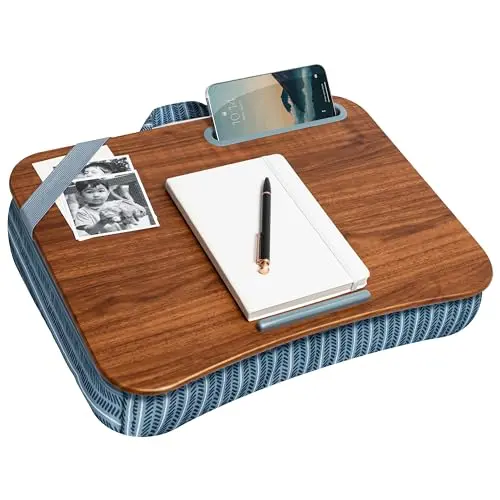
Designer Lap Desk – Lightweight Cushioned Work Surface
A lighter, design-forward lap desk with a solid 17.3 x 13.3-inch surface, phone slot, device ledge, and conforming microbead cushion. It’s built for schoolwork, remote work, and small-space setups.
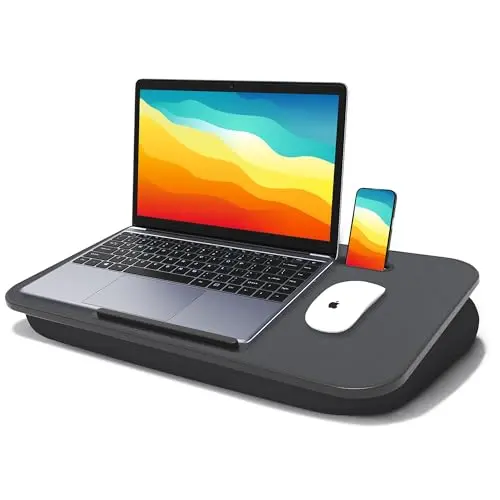
ZG – Washable Cushion Lap Desk for 17-Inch Laptops
A large lap desk with a removable, washable microbead cushion and a PVC leather surface. The spring-loaded stopper and media slot are aimed at 17-inch laptop setups that want a cleaner, more adjustable workspace.
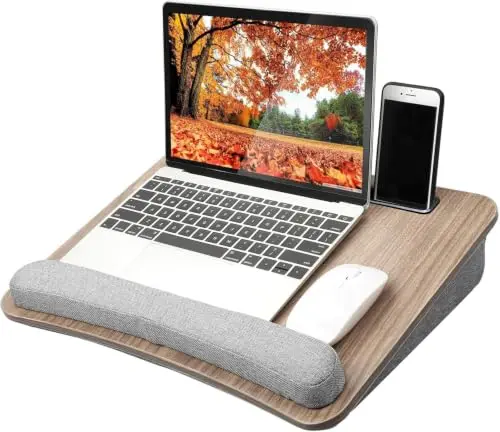
HNLD12 – Woodgrain Cushion Lap Desk
A woodgrain lap desk with a pillow cushion, anti-slip wrist pad, storage pocket, and tablet holder. It fits laptops up to 15.6 inches and doubles as a comfortable writing or reading surface.
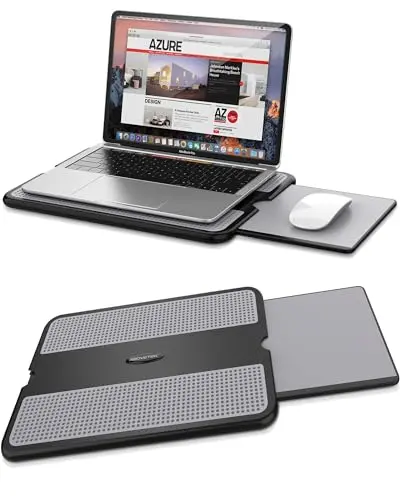
LD-165G – Retractable Mouse Pad Lap Desk
A compact wood lap desk with a retractable mouse pad that extends from either side. The anti-slip surface and heat shield are designed for bed, couch, and travel use.
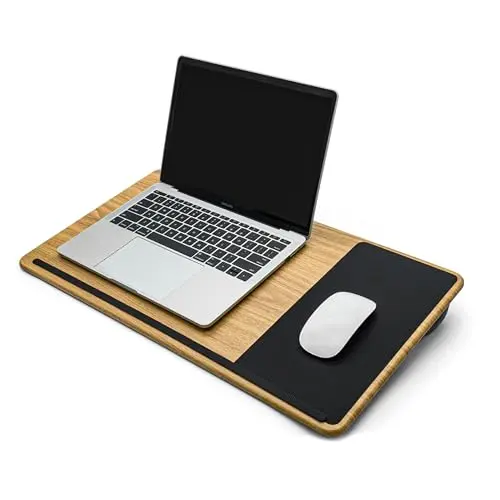
EL-LAPMU-UL – Large Wood-Pattern Lap Desk
A large wood-pattern lap desk with a soft cushion, wrist rest, and removable mouse pads on both sides. It’s sized for laptops up to 17 inches and built for bed, couch, or car use.
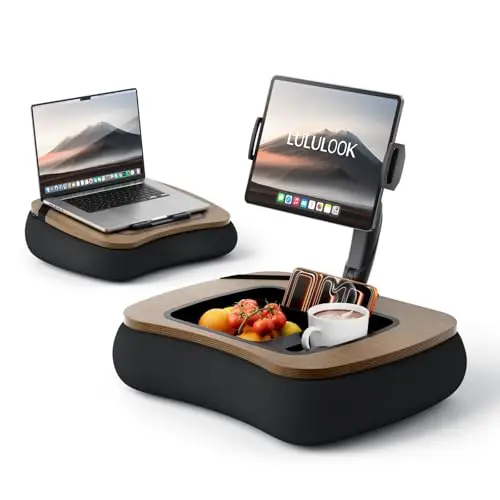
LDUS002 – 2-in-1 Lap Desk and Pillow Stand
A hybrid lap desk and pillow stand with a beanbag base, adjustable arm, and built-in snack bowl. It’s aimed at light laptop work, tablet streaming, and Kindle reading in bed.
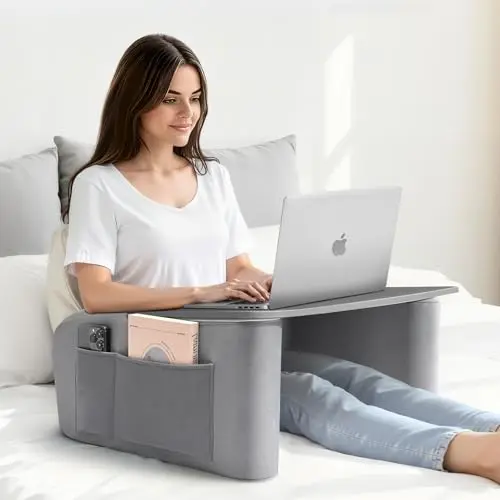
OP-66R – Reading Pillow Lap Desk with Arm Rests
A reading-pillow-style lap desk with a curved wooden surface, memory-foam arm rests, side pockets, and EPP legs. It’s built for bed, couch, and floor use with laptops up to 17 inches.
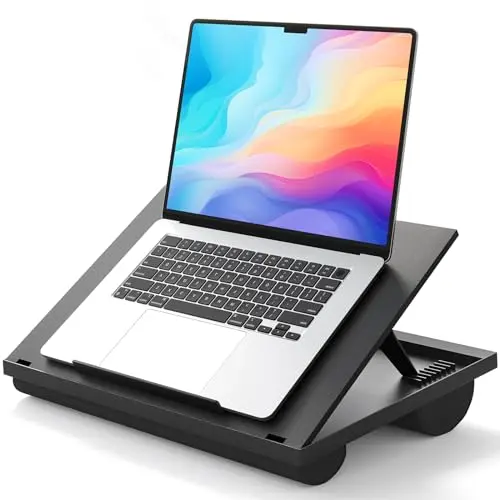
HNLD2 – Adjustable-Angle Lap Desk with Dual Cushions
An adjustable lap desk with eight tilt positions, dual cushion base, carry handle, and a wider anti-slip ledge. It’s a budget-friendly option for bed, couch, car, or floor use.
How We Evaluated These Laptop Pillow Desks
We didn’t spend weeks typing from a couch or measure heat buildup with lab instruments. What we did: cross-referenced 10 laptop pillow desk models from 8 distinct brands across six decision axes – surface size and laptop fit, cushion comfort and stability, adjustability and ergonomics, portability and storage, device holders and heat management, and build materials. We triangulated published specifications, feature sets, owner feedback where available, and use-case fit for people who work from bed, couch, car, or a shared living space. We mapped each model against representative buyer profiles: a student on a dorm bed, a remote worker on a couch, a traveler who needs to pack the desk, and a reader who wants a multi-use surface. We audited listed dimensions and device limits because a desk that claims 17-inch support but leaves no mouse room behaves differently in practice.
The scoring framework weighted real-world fit and comfort (70%) – how well each desk supports a laptop and a person through normal use – against feature differentiation (30%) – the holders, mouse surfaces, cushion designs, and portability details that separate one model from another. We have no commercial relationship with any brand here; recommendations track fit and differentiation, not brand preference. If you want the most balanced everyday pick, the LapGear Home Office Lap Desk is the one we’d start with. If your setup includes a second screen or longer gaming sessions, the SAIJI GX7 is the stronger match.
How to Choose the Right Laptop Pillow Desks
1. What Makes a Laptop Pillow Desk Comfortable for Long Sessions
A microbead cushion or a dual-bolster base tends to distribute weight more evenly than a thin foam pad, which matters when a laptop sits on your legs for an hour or more. You want the cushion to conform without letting the desk rock side to side. A rigid surface is the other half of the equation: it keeps the laptop flat and stops the whole setup from flexing as you type.
Heat is part of comfort too. Look for a surface that creates some airflow under the laptop, or a dedicated heat shield if you run a warmer machine. A laptop pillow desk that traps heat will feel uncomfortable even if the cushion is plush.
2. Surface Size and Laptop Fit
Start with the surface dimensions and the manufacturer’s laptop size rating, then check whether there is real mouse room left over. A desk that fits a 15.6-inch laptop but leaves no space for a mouse is fine for typing and poor for spreadsheets. If you use a 17-inch machine, look for a surface around 21 inches wide or more.
A device ledge at the front is a small feature that makes a big difference. It catches the laptop before it slides forward when you tilt the desk or shift position. A raised edge also gives you a place to rest a tablet or notebook.
3. Cushion Support, Stability, and Heat
The lap cushion should be deep enough to feel comfortable but firm enough to keep the desk from wobbling. Microbead fills tend to mold to your legs, while foam pads can bottom out over time. Stability also comes from the base material and the way the cushion is attached; a loose cushion is more likely to shift when you move.
If you run a hot laptop, a heat shield or an airflow channel is worth prioritizing. If you mostly type on a couch, the LapGear Home Office Lap Desk has one of the more balanced cushion-and-surface layouts in this lineup.
4. Adjustability and Device Holders
Tilt positions help you switch between typing and watching, but more angles don’t automatically mean better ergonomics. Check that the hinge feels secure and that the desk doesn’t sag at the highest setting. A phone slot or tablet holder is useful for video calls and second-screen browsing, while a wrist rest reduces pressure during longer mouse sessions.
If you want a true multi-device setup, the SAIJI GX7 adds a monitor holder that can support a small external display. That’s a niche feature, but it changes how much work you can get done from a couch.
5. Portability and Storage
If the desk will move between rooms or travel in a bag, check the carry handle and weight before anything else. A desk that feels fine on your lap can become annoying if it’s awkward to pick up. A thin profile helps with storage, but it can also mean less structure under the surface.
If you need a budget-friendly adjustable desk, the HUANUO HNLD2 covers the basics with a handle and a lightweight build. Just don’t expect the same material refinement as the wood or leather options.
6. Common Pitfalls When Buying a Laptop Pillow Desk
A too-soft cushion is a common trap: it feels great for five minutes and then lets the desk tilt as you type. Similarly, a small mouse area can make a laptop pillow desk feel cramped even when the laptop fits. Watch for plastic hinges on adjustable models, and check whether the mouse tray works for your dominant hand.
If spills or daily use are a concern, a washable cover or a wipe-clean leather surface is easier to live with than fabric. Also confirm that the desk fits your laptop plus the accessories you actually use, not just the laptop alone.
Frequently Asked Questions
1. LapGear Home Office vs AboveTEK LD-165G: which laptop pillow desk is better for couch work?
The LapGear Home Office Lap Desk is the easier recommendation for most couch work because its built-in mouse pad and phone slot keep the essentials in one place, and the dual-bolster cushion is more forgiving for typing than a hard tray. The AboveTEK LD-165G is the better travel pick if you want a retractable mouse pad that tucks away; its hard wood surface is less cushioned but more compact. Choose the LapGear for everyday lap comfort, and the AboveTEK for portability.
2. SAIJI GX7 vs MillHome ZG: which handles a 17-inch laptop better?
The SAIJI GX7 handles a 17-inch laptop with more room to spare because its surface is wider and it adds an external monitor holder for a second screen. The MillHome ZG is still a strong choice for large laptops, especially if you value a washable cushion cover and a spring-loaded stopper. For pure dual-screen productivity, pick the SAIJI; for easier cleaning and a lower-profile cushion, pick the MillHome.
3. Do laptop pillow desks actually work on a bed?
Yes, as long as the desk has a firm surface and a cushion that doesn’t collapse under the laptop. A microbead cushion tends to work better on a bed than a thin foam pad because it conforms to the mattress and your legs. Look for a device ledge to stop the laptop sliding, and leave some airflow around the machine. Very soft pillow desks are better for reading than for typing.
4. Can a laptop pillow desk fit a 17-inch laptop and a mouse?
Some do, but you need to check the surface width rather than trust the laptop-size claim alone. A 17-inch laptop plus a mouse needs generous mouse room and usually a surface over 21 inches wide. Models like the SAIJI GX7, MillHome ZG, and ergomi EL-LAPMU-UL are sized for that job. If you use a smaller laptop, a 15.6-inch desk with a device ledge is usually enough.
Final Verdict
For most people, the LapGear Home Office Lap Desk is the laptop pillow desk to start with. It balances a roomy surface, a built-in mouse pad, a phone slot, and a comfortable dual-bolster cushion without becoming a bulky piece of furniture. If you want a second screen or a more premium leather surface, the SAIJI GX7 is the better match. If you need to keep costs down, the HUANUO HNLD2 gives you adjustable tilt angles and a dual-cushion base for a budget-friendly setup. And if a 17-inch laptop and a washable cushion matter most, the MillHome ZG is the one to get. Pick by the way you actually work: couch typing, bed reading, travel, or a dedicated lounge station.
