
Best Travel Fans For White Noise – 2026 Reviews

Hotel air conditioning is either a jet engine or a whisper, and the fan you packed is supposed to be the reliable middle ground. A travel fan for white noise has a harder job than a desk fan: it needs to disappear into a carry-on, run long enough for a full night, and produce a steady, low sound that masks the room around it without adding a whine of its own.
The biggest dividing line is noise character. A fan can be rated quiet and still click, buzz, or hiss in a way that keeps you awake. The second is runtime and power flexibility, because white noise is most useful when it lasts until morning. The picks below cover different travel styles, from ultralight foldables to battery-heavy bedside fans, so you can choose by fit rather than by brand loyalty.
Best Travel Fans for White Noise – 2026 Reviews
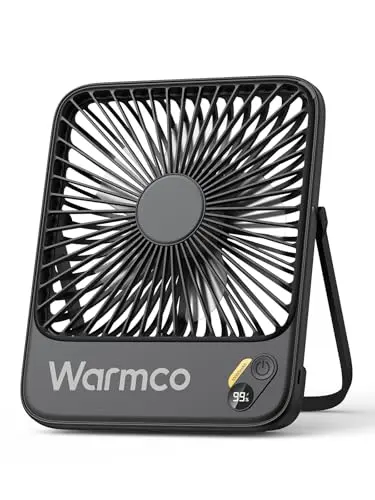
D3 – 10,000mAh Travel Fan for Sleep
A slim battery-powered travel fan with a 10,000mAh battery, four speeds, and a digital display for battery percentage and speed. It is built for overnight sleep, camping, and hotel rooms.
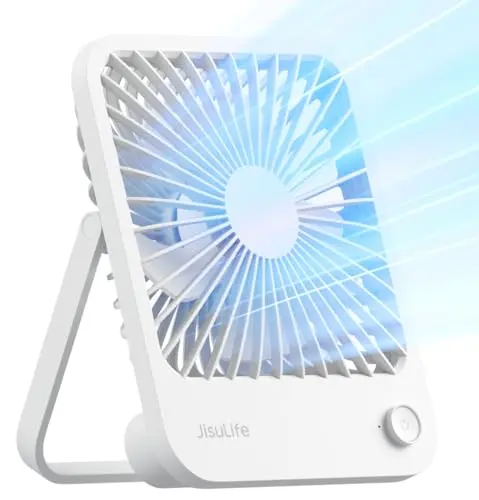
FA26 – Foldable Quiet Travel Companion
A compact rechargeable desk fan with a 180-degree foldable stand, four speeds, and a 4500mAh battery rated for up to 13 hours. It can stand, hang, or pack flat for travel.
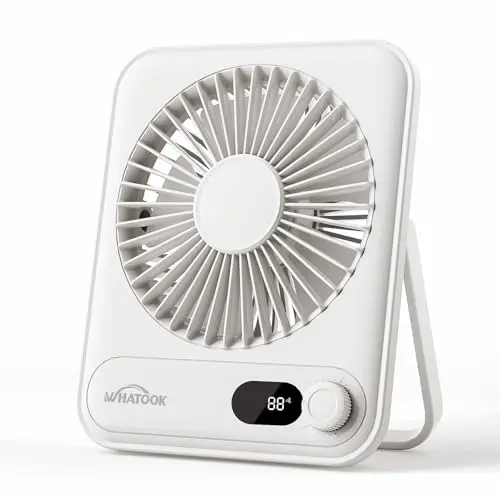
HL008 – Compact White Noise Desk Fan
A small rechargeable desk fan with 100 speed settings, a soft low-light display, and a 2000mAh battery rated for about 10 hours. It is designed to produce a quiet, steady breeze for sleep and office use.
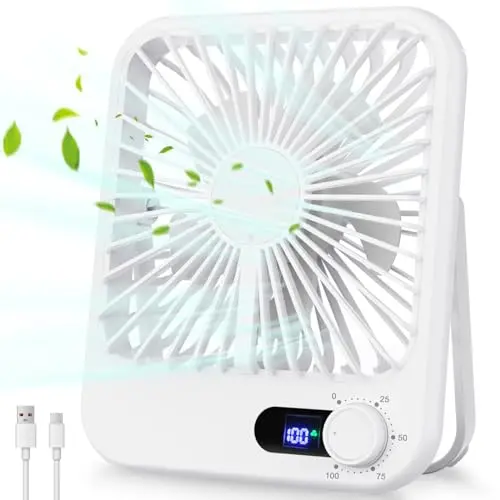
SK-101 – Slim 100-Speed Sleep Fan
A slim rechargeable travel fan with 100 speed settings, a rotating knob, and a rated noise level below 30dB. It can run on battery or USB power and folds into a laptop bag.
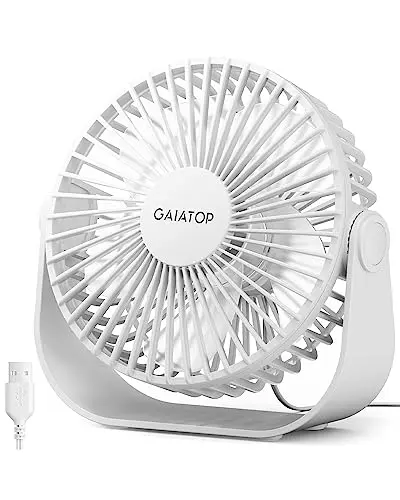
TF55B – USB Desk Fan for Travel
A compact USB-powered desk fan with three speeds, a 90-degree tilt, and a detachable cover. It weighs about 6.5 ounces and runs from a laptop, power bank, or wall adapter.
How We Evaluated These Travel Fans for White Noise
We didn’t run these through a full season of hotel stays or measure sound pressure with a calibrated meter. What we did: cross-referenced five travel fan models from five distinct brands across six decision axes – noise character, battery runtime, packed size and weight, airflow adjustability, power flexibility, and setup or mount options. We triangulated published specifications, feature sets, owner feedback where available, and use-case fit against the realities of sleeping away from home. Small fans can be quiet on paper and still produce a whine that cuts through a quiet room, so we prioritized published noise figures only when they were paired with feedback about sleep use. We mapped each model to a realistic traveler profile – light packer, long-haul sleeper, or budget-minded traveler – rather than scoring specs in isolation.
The scoring framework weighted real-world fit for sleep and travel (70%) – how well each fan balances quiet operation with enough airflow and runtime – against feature differentiation (30%) – unique advantages like USB-C pass-through, digital battery readouts, or foldable stands. We also weighed whether a fan can run while charging, because a dead battery at 2 a.m. defeats the purpose. We have no commercial relationship with any brand here; recommendations track fit and differentiation, not brand preference. If you want the most complete overnight travel package, the Warmco D3 is the benchmark. If packability matters more than maximum runtime, the JISULIFE FA26 is the easier carry.
How to Choose the Right Travel Fan for White Noise
1. Why White Noise Changes the Travel Fan Checklist
A standard desk fan is judged on airflow. A travel fan for white noise is judged on the sound it makes while moving that air. The best sleep fans produce a steady, low-frequency hum rather than a high-pitched whine, and they let you run that hum at a very low speed without stalling. That is why speed range matters as much as top-end power.
Look for a brushless motor if you want the widest spread between a gentle breeze and a louder stream. Brushless designs tend to run smoother and quieter at low speeds, which is where white noise fans spend most of their time.
2. Battery Runtime and Power Flexibility for Travel Nights
White noise is an all-night job, so battery runtime on low speed is the number that matters most. A fan rated for 20 hours on low can cover a full night with margin; a fan rated for 10 hours may need a top-up if you sleep late. USB-C charging is now the most convenient standard, and pass-through operation lets the fan run while plugged in.
If you want the longest overnight buffer in this group, the Warmco D3 is the pick. Its 10,000mAh battery and digital runtime display make it the easiest fan to trust for a full night away from home.
3. Packed Size, Weight, and Stand Options That Fit a Carry-On
Travel fans live or die by packed size and weight. A fan that weighs under a pound and measures around an inch thick can slide into a laptop bag; a larger desk fan may still fit, but it will compete with clothes. Foldable stands and hanging loops add placement options in tight hotel rooms.
If packability is the priority, the JISULIFE FA26 is the easier carry. Its 180-degree foldable stand and 216-gram frame make it the least fussy option to toss in a bag.
4. Airflow Control and White Noise for Sleep
Three speeds can work, but fine airflow control is a real advantage for white noise. A 100-speed fan lets you dial in the exact volume of air and sound you want, while a three-speed fan may jump from too soft to too loud. The lowest speed should be stable and quiet, not a barely-there setting that cuts out.
Also consider the sound character: a smooth hum masks background noise better than a rattle or click. If you are sensitive to high-pitched fan noise, prioritize models with a brushless motor and owner feedback that mentions sleep use.
5. Build Quality, Cleaning, and Travel Durability
Travel fans get tossed into bags, so build quality is not a luxury. Look for tight seams, a stable base, and a detachable cover that makes it easy to clear dust from the blades. A one- or two-year warranty is a useful signal, but it does not replace careful packing.
Plastic bodies are normal in this category; the important thing is that the stand, knob, and grille feel secure rather than loose. If you plan to run the fan every night, check owner feedback for long-term battery or motor complaints.
6. How Much Should You Spend on a Travel Fan for White Noise?
The market splits into three rough tiers. Budget-friendly travel fans often skip a battery or use a smaller one, so they work best with a power bank or USB outlet. Mid-range models add longer runtime, quieter motors, and more speed settings. Premium picks bring larger batteries, digital displays, and USB-C pass-through, which can be worth it if you rely on white noise every night.
Spend for runtime and noise quality before you spend for extras. A simple fan that runs all night at a soft hum will beat a feature-heavy fan that dies at 3 a.m.
Frequently Asked Questions
1. What's the difference between the Warmco D3 and the JISULIFE FA26 for white noise?
The Warmco D3 is the longer-runtime pick: its 10,000mAh battery and digital display make it easier to trust for a full night, and USB-C input/output adds flexibility. The JISULIFE FA26 is lighter and more packable, with a 180-degree foldable stand and a 4500mAh battery rated for up to 13 hours. For the longest overnight buffer, the Warmco D3 is the safer pick; for the smallest carry, the JISULIFE FA26 wins.
2. Are travel fans actually quiet enough to mask background noise?
Quiet enough for white noise is different from quiet enough for an office. Look for a sub-40dB rating, a low-speed setting that stays smooth, and a brushless motor if you are sensitive to whine. A fan with a steady hum can mask hallway noise even if it is not the quietest model on paper; a fan with a rattle or click will annoy you at any volume. The quietest options here are the ones that give you fine speed control so you can stay in the soft range.
3. How long should a travel fan run on a charge for overnight white noise?
For a full night, aim for at least 8 hours on low speed, with 10 to 12 hours as a more comfortable buffer. Fans with 10,000mAh batteries can stretch well beyond that, while smaller 2000mAh models usually need a mid-trip charge if you run them all night. If you sleep hot or need more airflow, step up to a model with pass-through power so you can keep it running while it charges.
4. What's the difference between the Cooperwin SK-101 and the WHATOOK HL008?
The Cooperwin SK-101 is the more aggressive quiet pick, with a sub-30dB rating and 100 speed settings for dialing in a very soft breeze. The WHATOOK HL008 also offers 100 speeds, but adds a soft low-light display and a more budget-friendly price tier. Both are compact, though owner feedback on battery reliability is more mixed for the Cooperwin. If you want the lowest noise floor, the Cooperwin is worth a look; if you want a balanced value pick, the WHATOOK is easier to recommend.
5. Can a USB-powered travel fan work without a battery?
Yes, but it is tethered to a USB power source such as a power bank, laptop, or wall adapter. That setup can work well for white noise if you already carry a large power bank, and it avoids battery degradation over time. The tradeoff is convenience: a corded fan is harder to place in a hotel room, and it will stop if the power source runs out. For overnight use, a battery-powered fan is usually the more reliable choice.
Final Verdict
For most travelers chasing white noise, the Warmco D3 is the answer. It pairs a 10,000mAh battery with a sub-40dB sleep mode and a digital display, so you can trust it to last the night without guessing. If you are packing ultralight, the JISULIFE FA26 gets you a foldable, quiet travel fan in a much smaller package. And if you want fine airflow control on a budget, the WHATOOK HL008 is the value-minded pick. The right choice comes down to whether you prioritize runtime, packability, or price – but any of these can turn a strange hotel room into a sleep-friendly one.
